Logo Mockup 3D Sign on Black Wood Wall – A Strategic Tool for Professional Brand Presentation
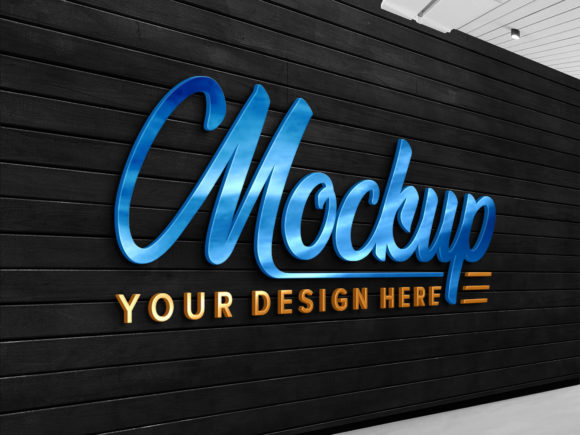
The Logo Mockup 3D Sign on Black Wood Wall is a powerful design asset that allows users to visualize their logos in a realistic, high-quality setting. This mockup features a three-dimensional sign displayed against a sleek black wood wall background, offering an elegant and professional look. The file format includes a fully layered PSD with smart object replacement capabilities, enabling users to insert their own logo or text effortlessly while maintaining the correct lighting, shadows, and texture. With its 300 DPI resolution and 3000 x 2400 pixel size, it delivers exceptional clarity for both digital and print use.
Strategic Value of Realistic Logo Mockups
In today’s competitive marketplace, branding is more than just having a good product or service—it's about creating a strong visual identity that resonates with your audience. The Logo Mockup 3D Sign on Black Wood Wall serves as a strategic tool for professionals who want to showcase their brand with authenticity and impact. It provides a clean, versatile backdrop that highlights the logo without distraction, making it ideal for presentations, proposals, marketing materials, and portfolio work.
For entrepreneurs and small business owners, this mockup can be used during early branding phases to test how a logo appears in a physical context. For marketers and designers, it offers a way to demonstrate the versatility of a brand mark across different applications—whether it's for storefront signage, website headers, or promotional assets. Its realistic rendering ensures that stakeholders see the logo in a natural environment, which supports better decision-making and alignment with brand goals.
How to Use the Mockup Effectively
One of the standout features of the Logo Mockup 3D Sign on Black Wood Wall is its ease of use. The smart object layer means you don’t need advanced Photoshop skills to replace the placeholder logo with your own. Simply double-click the smart object, paste your design, save, and exit. The system automatically adjusts the lighting and shadow effects so your logo looks like it was professionally rendered onto the sign.
This intuitive process makes it especially useful for teams with limited graphic design expertise. Whether you're a freelancer managing multiple client projects or an educator preparing brand examples for students, the ability to swap logos quickly and accurately can streamline your workflow and improve productivity.
Best Practices for Logo Mockup Application
- Align with brand aesthetics: Choose the Black Wood Wall version when your brand values sophistication, minimalism, or a modern yet organic feel. The dark wood adds depth and contrast, helping your logo stand out.
- Test in real-world scenarios: Use the mockup to simulate how your logo will appear on actual signage, such as retail displays or event banners. This helps identify potential issues with visibility or legibility before production.
- Enhance storytelling: Incorporate the mockup into brand storybooks or case studies to show clients or customers where and how the logo will be used. This builds trust and demonstrates attention to detail.
- Customize for specific audiences: Adjust the placement, scale, and orientation of the logo within the mockup based on the target demographic or use case. For example, a larger logo might suit a storefront display, while a smaller one could represent a mobile app icon.
When to Rely on This Mockup
The Logo Mockup 3D Sign on Black Wood Wall isn't just for quick visuals—it's a strategic choice when presenting logos in a professional context. Consider using it in the following situations:
- Client Presentations: Show clients how their logo will appear on signage to help them visualize the final outcome before approval.
- Portfolio Displays: Feature your design work on a realistic sign to demonstrate your ability to create logos that function well in tangible environments.
- Marketing Campaigns: Use the mockup as part of campaign imagery to reinforce brand presence in physical spaces, such as pop-up shops or trade shows.
- Internal Branding Workshops: Help team members understand the brand's visual identity by displaying logos in realistic settings during planning sessions.
What to Consider Before Using the Mockup
While the mockup is highly functional, there are key considerations to ensure it contributes meaningfully to your strategy:
- Relevance to the message: Ask whether the black wood wall aligns with your brand's tone. If your brand leans industrial or rustic, this mockup fits perfectly; if it's bright and playful, another background may be more appropriate.
- Use in context: Avoid using the mockup in isolation. Instead, pair it with other visuals or copy that explains the purpose behind the sign, such as "Our new storefront identity" or "This is how we’ll present our brand at events."
- Maintain consistency: If you’re using this mockup for a series of designs, ensure all visuals follow the same style and quality standards. Consistency strengthens brand perception and professionalism.
- Understand limitations: While the mockup is excellent for static images, it won’t account for dynamic lighting changes or weathering effects that occur in real-world signage over time. Use it as a guide, not a final proof.
Supporting Long-Term Branding Goals
Branding is a long-term investment, and tools like the Logo Mockup 3D Sign on Black Wood Wall play a role in ensuring that every step is intentional. By using this mockup, you can evaluate how your logo performs in various formats and settings, which is crucial for consistent brand positioning. It also helps you avoid costly mistakes, such as poor scaling or incorrect color representation, which could undermine your brand’s credibility.
For educators and creators, this mockup becomes a teaching resource. It illustrates best practices in logo application, showing students or followers how to transition from concept to real-world usage. In creative agencies, it can speed up client reviews and reduce back-and-forth, allowing for faster project delivery and improved satisfaction.
Real-World Applications
Let’s explore a few practical examples of how the Logo Mockup 3D Sign on Black Wood Wall can support strategic outcomes:
- A local café owner wants to redesign their storefront sign. They use the mockup to present three logo options to investors, each styled differently but placed consistently on the same type of sign. This helps everyone compare choices objectively and decide on the most marketable option.
- A freelance designer creates a brand package for a startup and includes the mockup in the final deliverables. The client sees the logo in a realistic setting and feels confident in the design’s adaptability and scalability.
- An online retailer uses the mockup in social media posts to highlight their new physical store location. The image is visually compelling and clearly communicates the brand’s expansion strategy to followers.
Risks of Using the Mockup Without Strategy
Though convenient, using the Logo Mockup 3D Sign on Black Wood Wall without a clear objective can lead to ineffective results. For instance, placing a poorly designed logo on the mockup won’t magically make it look professional. Similarly, using the same mockup repeatedly across all presentations may dilute the brand’s uniqueness or give a generic impression.
Another risk is relying too heavily on the mockup without testing it in diverse environments. Just because a logo looks great on a black wood wall doesn’t mean it will perform equally well on glass, metal, or fabric surfaces. Always consider the broader ecosystem in which your brand will exist.
Intentional vs. Random Use
To maximize value, approach the Logo Mockup 3D Sign on Black Wood Wall with intentionality. Here’s how to do that:
- Define the goal: Are you trying to impress investors? Educate a client? Showcase creativity? Clarify your objective before inserting your logo into the mockup.
- Choose the right moment: Use the mockup during critical decision points—like when refining a logo design or when demonstrating brand applications to a new audience.
- Pair with supporting content: Don’t just show the logo on the sign; explain what it represents and how it ties into your brand strategy. Context is everything in effective communication.
- Evaluate performance: After using the mockup in a presentation or campaign, gather feedback. How did it influence perceptions? Did it clarify the brand vision? Let these insights inform future use.
Maximizing Creativity and Productivity
One of the greatest advantages of the Logo Mockup 3D Sign on Black Wood Wall is its contribution to both creativity and productivity. Since it’s easy to edit and integrates seamlessly with any logo via smart objects, you can experiment with variations quickly. This encourages iteration and refinement, which are essential in the design process.
Additionally, the mockup’s well-organized layers and folders allow for efficient editing and customization. Designers can tweak colors, add textures, or even modify the sign structure to fit unique needs—all without disrupting the realism or quality of the scene. This level of control ensures that the final output remains aligned with brand guidelines and project requirements.
Planning Tips for Maximum Impact
Here are a few tips to plan your use of the Logo Mockup 3D Sign on Black Wood Wall effectively:
- Start with a rough draft: Insert a basic version of your logo first to get a sense of how it interacts with the mockup’s lighting and shadows. Make adjustments before finalizing.
- Match the brand palette: Ensure your logo’s colors complement the black wood wall. Sometimes slight tweaks in hue or saturation can significantly enhance the visual harmony.
- Consider the angle: The mockup provides a front-facing view, but think about how your logo will be seen in reality. Will it be viewed from a distance? From a low angle? These factors can influence how you position your design.
- Use it for comparisons: When evaluating multiple logo concepts, apply them all to the same mockup. This side-by-side comparison can reveal subtle differences in readability and visual appeal.
Why This Mockup Stands Out
Among the many available logo mockups, the Logo Mockup 3D Sign on Black Wood Wall distinguishes itself through its combination of realism, usability, and flexibility. Unlike generic templates that lack depth, this mockup simulates the physical properties of a wooden surface, complete with grain texture, subtle reflections, and accurate lighting angles. This realism helps stakeholders grasp the intended effect of the logo in a tangible space.
Moreover, the inclusion of a JPEG version in the pack ensures that users have ready-to-use images for web-based sharing or printing. It eliminates the need for additional rendering or exporting steps, saving valuable time during tight deadlines.
Investing in Quality for Better Results
High-quality mockups like the Logo Mockup 3D Sign on Black Wood Wall are worth the investment when you consider the long-term benefits they offer. They reduce the guesswork involved in logo placement and provide a professional standard that elevates your overall brand communication. Whether you're launching a new product line, rebranding, or simply refining your visual identity, having access to a realistic and editable mockup can make a significant difference in how your brand is perceived.
By choosing this mockup, you’re not only improving the presentation of your logo—you're also building a foundation for consistent and impactful brand storytelling.